Last Updated :
February 10, 2023
Abdulla Basha

3 types of medical presentations (and how to give them)

Here are some tips for presenting the top three types of medical presentations: lectures, research presentations, and case reports.
Healthcare professionals attending and applauding a medical presentation in a clinical setting

With your long to-do list as a medical professional, giving presentations is probably not a high priority. Yet, medical presentations are inevitable. Are you ready to give them when your job requires it? If so, where do you even start?

We want to make it a little easier for you to present data-heavy medical topics in an easy-to-understand way.

So, let’s dive right in with the top three types of medical presentations.

Key Takeaways:

  • Structure your medical presentation into a story to make it memorable.
  • Medical presentations can be lectures, research, or case presentations.
  • Customize the presentation based on the type and goal.

1. Lectures

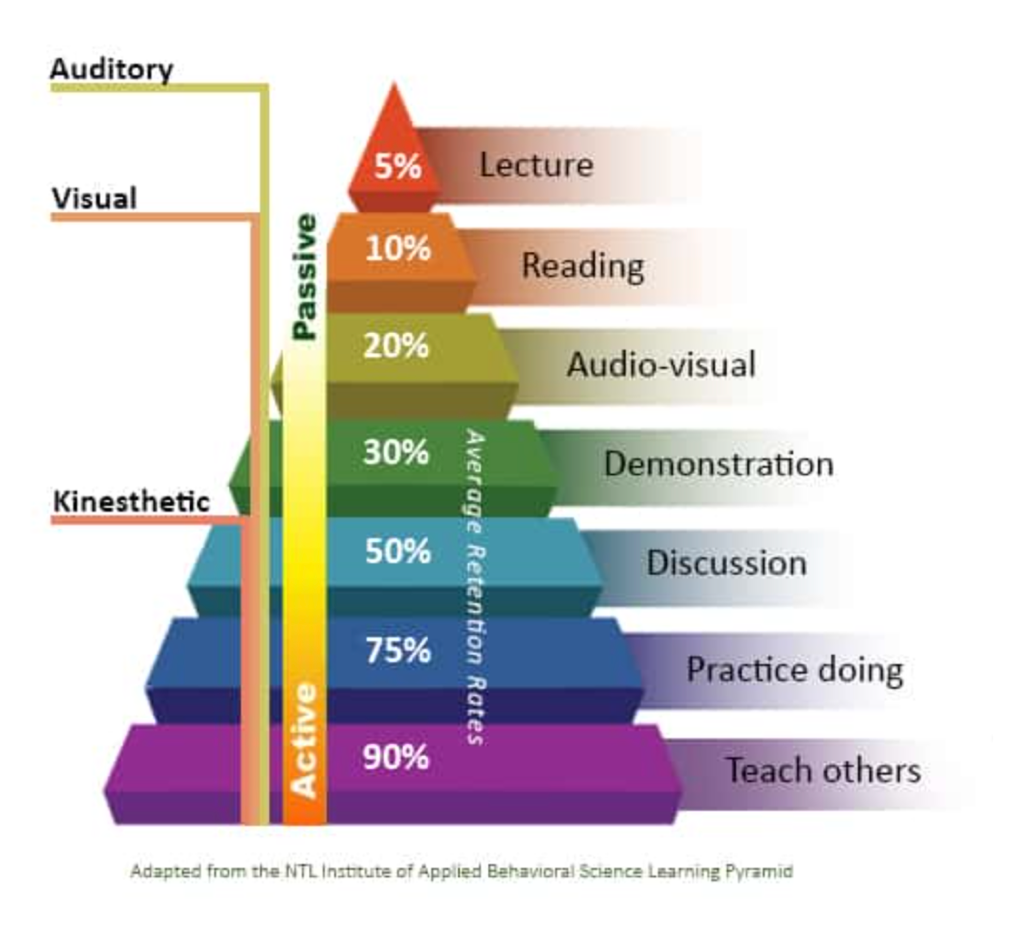
Medical lectures educate an audience about a medical topic. They’re one of the most challenging presentations. According to the Learning Pyramid, lectures are the most passive learning techniques, which is also why they have the lowest retention rates.

ChartDescription automatically generated with medium confidence
Image source

There are several settings for educational lectures, including:

  • Conferences
  • Training
  • University or school lectures

Medical lectures help students or an audience comprehend complex medical information and then turn what they learned into actionable strategies.

For example, you may teach students with little medical knowledge about a new medical concept. But they must understand the topic and be able to recall it for examinations.

Tips for giving medical lectures

How can you turn one of the most challenging presentations into an engaging, memorable lecture? Here are a few tips to ace your educational medical lectures:

  • Be interactive: Use Q&As, activities, and open discussions.
  • Hand out resources: Give physical booklets students can review after the presentation.
  • Use multimedia: Add audio-visual elements like images, video, and audio clips.
  • Use simple language: Your audience is learning, so they need simple language and plenty of definitions to understand the topic.
  • Make it entertaining: Keep your audience’s attention with a more engaging and entertaining presentation.

UnitedHealth Group incorporated imagery and movement to show rather than tell about mental health in 2022 to boost their engagement on the topic.

TextDescription automatically generated with medium confidence
Image source

2. Research presentations

The most information-heavy medical presentation is the research presentation. Research presentations share findings with experienced medical professionals, usually in conference settings. Some of the audience includes:

  • Investigators
  • Ph.D. students
  • Medical professionals and experienced doctors

Research presentations can also be part of healthcare marketing. You may have to introduce a new process, pharmaceutical, or device to encourage other healthcare professionals to adopt it in their practices.

Tips for giving research presentations

Use these tips to improve your research presentations:

  • Speak on a higher level: You’re talking to a knowledgeable audience, so they expect a higher level of research.
  • Back all facts with data: Use statistics and research to back all claims.
  • Use power poses: Build authority with a confident presentation.
  • Grab the audience’s attention: Start your presentation by giving your audience a reason to care, like a problem you want to solve.
  • Build up the conclusion: Structure the research in a natural, progressive order that builds up to your conclusion.
  • Look at the future: Conclude with how the research findings will impact the future of medicine.
  • Visualize data: Simplify findings and data with visuals and charts.

Cardinal Health transformed the complex research for Smart Compression into understandable slides using a mix of graphics and storytelling in their medical presentation.

3. Case reports

Medical professionals must give oral case reports when transferring information between providers or a team. These presentations are very brief and often don’t require visuals.

Sometimes a case is especially unique and offers educational value to others. In that case, presenters should transform their quick oral case reports into a longer presentation that incorporates data and visuals.

Tips for giving case reports

Case reports use a similar structure to oral patient presentations, except with more details about each point. You’ll still want to pack as much information in a short presentation as possible.

  • Begin the presentation with a patient overview: Start by introducing the patient, including all relevant demographic details in summarized graphics and lists.
  • Present the history of the patient: Describe the patient’s history, why they sought care, and the symptoms they presented in charts and visuals.
  • Explore medical information: Dive into the medical details, like treatment and history, using a storytelling structure to connect the information.
  • Offer a plan: Outline a treatment plan alongside proof.

Summarize details in charts: You’ll pack a large amount of information in a concise presentation, so use plenty of charts and diagrams to summarize data and simplify outcomes.

Tips for preparing engaging medical presentations

Your medical presentations have highly complex topics rich with data, which is why many teams use the best AI presentation makers to simplify creation. These topics can easily feel overwhelming or even boring if they don’t have the right structure and appearance.

Here are three medical presentation tips we’ve learned to help you prepare and present high-quality medical presentations that engage AND inform.

Know your audience’s knowledge level

Before building and presenting a medical topic, you must know your audience’s knowledge level. A lecture to a class of first-year college students will sound far different from a presentation to doctors with 10+ years of industry experience.

Build a presentation around your audience’s knowledge, so it’s understandable yet challenging. By taking this extra step, you’ll know what points need more explanation and what topics you can dig deeper into based on your audience’s experience.

Build a structured story

A complex topic becomes easy to understand and follow if you use a storytelling structure. You might ask, “How can a lecture on a new treatment be a story?”

Any time you communicate, it’s a story: You have the challenge to solve, potential solutions to try, and a final winner (like when presenting medical research). You can structure that story in a progressive order or by announcing one primary outcome and providing a list of proofs (like with patient case studies).

Focus on a goal

The goal of medical presentations can be educating, training, or persuading the audience, depending on the type of medical presentation. Knowing your goal guides which data is most relevant to bring your desired outcome.

Communicate at the speed of healthcare with Prezent

Whether you’re preparing a lecture, research presentation, or case report, creating presentation slides is probably far down your priority list. The fast-paced healthcare industry has enough duties vying for attention. So how are you supposed to squeeze in hours to build an engaging presentation?

Prezent has your back. No need to sweat the details as we have already developed leading presentation templates perfect for data-driven presentations. Personalize to your audience’s knowledge and presentation preferences with AI-powered technology. Save time and energy with access to 35,000+ custom-built slide templates designed with key business and pharma storylines in mind.

You’ll have an engaging and clear presentation deck in minutes rather than hours. Take back your time and communicate efficiently with Prezent so you can focus on turning your ideas and insights into action.

Our proof is in our results. Schedule a demo to see the platform in action.

Ready to create impactful presentations?

Try for free

About the author

Picture of Abdulla Basha

Abdulla Basha

Abdulla is the VP of Growth Marketing at Prezent AI with over 14 years of experience in digital marketing and SaaS growth. He has worked with leading startups such as Clearout and Simplilearn, driving organic growth, scaling revenue, and building high-impact SEO and content strategies. Passionate about data, AI, and performance marketing, Abdulla focuses on turning search and storytelling into measurable business outcomes. You can connect with him on LinkedIn.

No items found.
No items found.

Related resources

BLOG
Supriya Sarkar
April 1, 2026
The best B2B AI tools for enterprise teams: Features, pros and cons, pricing, and use cases
Find the best B2B AI tools for enterprise teams. Evaluate features, pricing, pros and cons, and use cases to choose tools that fit your workflows and deliver measurable impact.
BLOG
Niyati Mahale
April 1, 2026
11 best Genspark AI alternatives I tested for 2026
This guide covers the best Genspark AI alternatives for content, SEO, and presentations. Compare features, pricing, and real-world usability to find the right tool.
BLOG
Supriya Sarkar
April 1, 2026
What is presentation software? A complete guide to how it works, what to look for, and how to choose the right one
What is a presentation software? This guide explains how it works, key features to look for, and how to choose the best presentation software.
BLOG
Supriya Sarkar
March 31, 2026
PopAI review: Complete breakdown of features, pricing, and alternatives
PopAI review: Is this AI tool right for business presentations? Explore features, pricing, limitations, and enterprise alternatives.
BLOG
Niyati Mahale
March 27, 2026
Microsoft Copilot review for presentations: features, pricing & limitations
Explore Microsoft Copilot’s features, pricing, and limitations for presentations. See how it performs and whether it fits your workflow.
BLOG
Niyati Mahale
March 27, 2026
Adobe Review (2026): Is Adobe InDesign Worth It for Business Use?
This Adobe review evaluates Adobe InDesign’s features, pricing, and usability. See how it performs for business workflows and where it falls short.
BLOG
Niyati Mahale
March 27, 2026
Best AI Pitch Deck Generators in 2026 (Tested & Reviewed)
I tested the best AI pitch deck generators to see which tools actually help you build clear, structured, and convincing pitch decks faster.
BLOG
Supriya Sarkar
March 26, 2026
10 Best PopAI alternatives: Compare features, AI capabilities, pricing, and free plans
Find the best PopAI alternatives and AI presentation makers. Compare AI features, pricing, and free plans to create smarter, more professional presentations.
BLOG
Niyati Mahale
March 27, 2026
Best Plus AI Alternatives in 2026: Top 8 AI Presentation Tools
I tested the best Plus AI alternatives to see which tools actually create presentation-ready decks. Here are the top AI presentation tools worth using in 2026.
BLOG
Supriya Sarkar
March 27, 2026
Nano Banana review: Evaluating strengths, workflow gaps, and AI solutions for enterprise presentations
Nano Banana review for enterprise presentations. Explore visual strengths, identify workflow gaps, and see how teams use AI to build faster, executive-ready presentations.
BLOG
Niyati Mahale
March 27, 2026
11 Best SlideShare Alternatives for Sharing Presentations
Explore the best SlideShare alternatives for creating and sharing presentations. Compare tools for hosting, collaboration, design, and presentation analytics.
BLOG
Niyati Mahale
March 23, 2026
Beautiful.ai Review (2026): Features, Pricing, Pros & Cons
An in-depth Beautiful.ai review covering features, pricing, pros, and limitations to help you decide if it’s the right presentation tool for your needs.
Free 14-Day Trial*

Customized On-Boarding*