Last Updated :
July 4, 2025
Supriya Sarkar

Mastering Business Storytelling: Techniques to tell a compelling story in presentations

Learn how to craft memorable, clear, and meaningful stories that connect with your audience and help communicate with purpose.
business storytelling

The average professional in the U.S. is exposed to 1–3 presentations every workday, totalling nearly 20 each month. A global study by Atlassian, surveying over 5,000 professionals across four continents, confirms just how routine presentations have become in our workday. [1]

But let’s be honest—how many of those presentations actually stick?
Think about the company presentations you attended in the past few days. How many can you actually recall? How many of them made an impact on you? Probably just one or two, if any.

No matter how much time you spend gathering insights, designing slides, and rehearsing your delivery, it can all go unnoticed if your audience walks away without remembering the core message if you don’t strike a chord.
That’s where storytelling changes the game.

A strong story isn’t just a nice touch; it’s often the difference between being heard and being remembered.

When done right, storytelling can:

  • Simplify complex topics and spark curiosity
  • Drive decisions
  • Build an emotional connection
  • Strengthen the logical flow of information
  • Help your audience retain key ideas long after the presentation ends

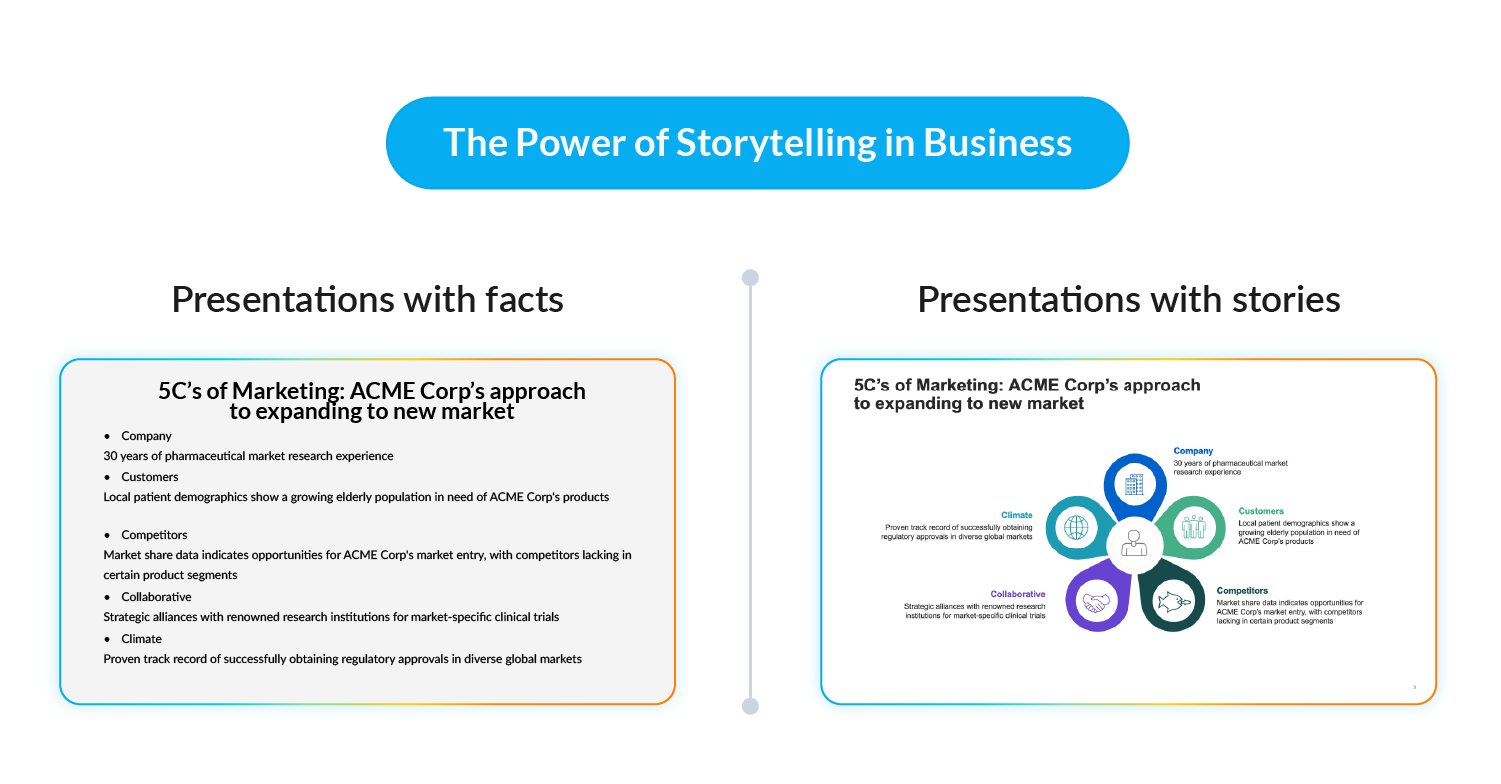
In fact, research from the Stanford Graduate School of Business shows that stories are up to 22 times more memorable than facts alone.

How to tell a good story in business presentations:

Incorporating storytelling into business presentations is easier said than done.
It’s not just about adding a few anecdotes to your slides. It’s about crafting a clear, compelling, and relevant narrative that connects with your audience and encourages them to act.

Learn how to get it right:

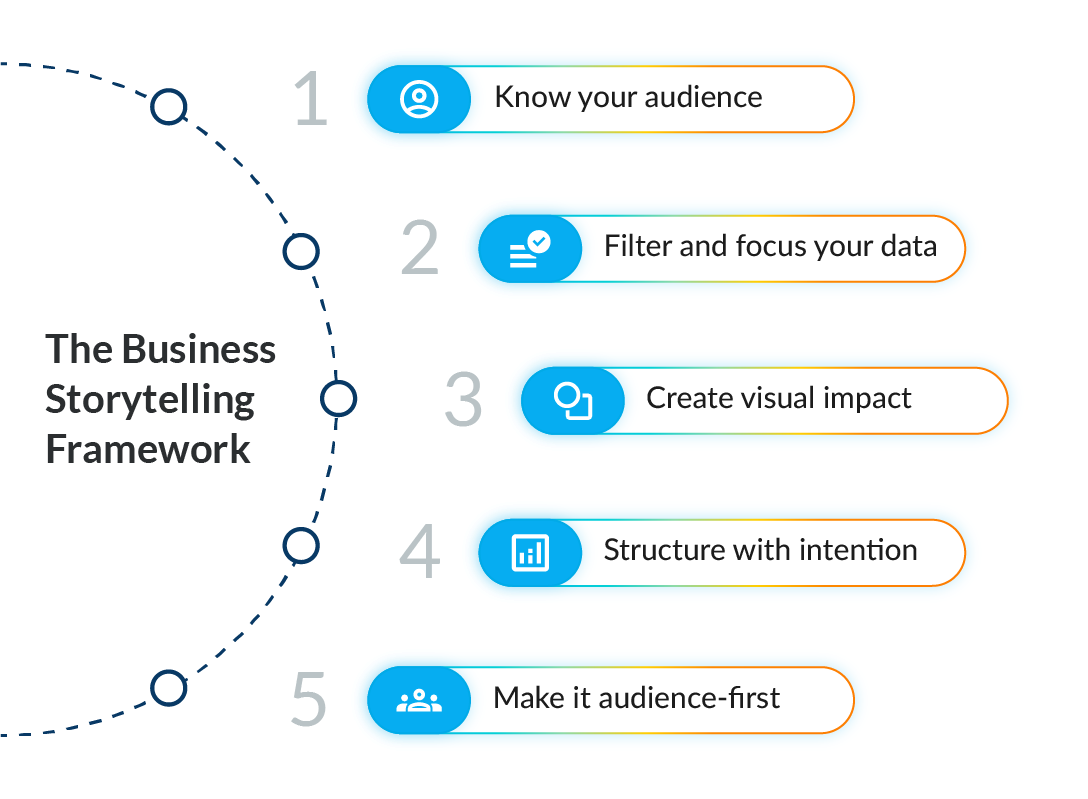
Start with a deep understanding of your audiene:

Every effective story begins with the audience in mind. Not all audiences are the same, and the same presentation won’t work for different groups.
For example:

  • Presenting to peers or technical teams:
    You can comfortably use industry jargon, acronyms, and deep technical explanations because you’re speaking to a group with shared expertise.
  • Presenting to executives or investors:
    You need to simplify without dumbing down. Use accessible language, frame insights around business impact, and focus on the "why it matters" rather than just the "how it works."

Tip: Understand your own and your colleagues' communication styles (like Myers-Briggs, but for how you communicate) before building your presentation: Who are they? How do they like to receive information? How can you make sure your message lands with them?  

Filter and focus your data:

More information doesn’t always mean more insight. A powerful story filters out the noise and highlights only the most relevant data points—the ones that help move the narrative forward and make decision-making easier.

  • Highlight only the most critical insights that directly support your storyline.
  • Always connect data to outcomes. Instead of just saying "Revenue increased 20%", explain "Revenue increased 20%, enabling faster market expansion and new hiring initiatives."
  • Avoid data-dumping. If a chart or number doesn't answer the audience’s key question—"Why should I care?"—leave it out.

Remember: In a strong business story, data supports the narrative—it doesn’t replace it.

Bring your story to life visually:

Visual storytelling is no longer optional—it’s needed. According to MIT research, humans can process an image in just 13 milliseconds. That means every slide should communicate the core idea visually in an instant. To create a more meaningful and memorable experience:

  • Use simple, clear layouts—each slide should focus on one central idea, supported by relevant details and data.
  • Choose visuals (charts, icons, infographics) that strengthen your message.
  • Minimize text clutter—favor visuals that guide the eye and make your message pop.

Effective visual storytelling doesn’t just look good; it’s easier to understand and helps businesses make decisions faster.

Structure with intention:

Even the best ideas can fall flat without the right structure. A strong presentation takes your audience on a logical journey that keeps them engaged from start to finish. While storylines may vary depending on your objective, an effective playbook often includes:

  • Set the stage: Provide context and define the purpose.
  • Build tension: Introduce a challenge, opportunity, or gap in understanding.
  • Deliver the resolution: Share key insights, recommendations, or a clear call to action.

This type of structure aligns with how people naturally absorb information, helping you capture attention and ensure your message lands.

Keep it audience-first:

The golden rule of business storytelling: It’s not about what you want to say but what your audience needs to hear. Therefore, shift your focus to a more audience-centric mindset.

  • Spend less time on "what we did" and more time on "what it means to them."
  • Tailor every slide, every stat, and every insight to your audience’s goals, pain points, and priorities.
  • Make it easy for them to understand, remember, and act.

When you shift from "presenting information" to "taking your audience on a journey," you create presentations that not only inform but inspire action.

Simplify business storytelling with Prezent:

Prezent has simplified business storytelling for professionals. Creating a strong business presentation storylines shouldn’t take hours or require you to start from a blank slide. With Prezent’s Story Builder, you get a head start with expert-designed templates that help you shape your message faster and more effectively.

Whether you're preparing a brand strategy, sales pitch, or performance review, Story Builder helps you move beyond simply listing facts. It provides a structured tool to craft a clear, creative, and emotionally engaging narrative in minutes.

What you can do with Story Builder:

  • Start with proven storylines: Choose from 1,000+ business story templates created by experts for real-world use cases.
  • Tailor to your audience: Easily adjust the flow and message to match your audience’s needs—no guesswork required.
  • Save hours of effort: Skip the time-consuming formatting and focus on your message instead.
  • Customize with flexibility: Change, add, or remove sections as needed to fit your specific goals.
  • Work seamlessly with your team: Share storylines, set access controls, and collaborate easily from draft to final delivery.
  • Look polished and stay on-brand: Create professional-quality presentations that are visually consistent and aligned with your brand.

With Story Builder, you’re not just making slides, you’re crafting business stories that are clear, convincing, and ready to deliver. A strong storyline helps you emotionally connect with your audience, explain technical details with ease, and leave a lasting impression that encourages action long after the presentation ends. Use Story Builder to write smarter and more impactful stories every time.

Schedule a demo to see Story Builder in action, or start your free trial to explore how it can elevate your company’s communication.

Ready to create impactful presentations?

Try for free
No items found.
No items found.

Related resources

BLOG
Supriya Sarkar
April 1, 2026
The best B2B AI tools for enterprise teams: Features, pros and cons, pricing, and use cases
Find the best B2B AI tools for enterprise teams. Evaluate features, pricing, pros and cons, and use cases to choose tools that fit your workflows and deliver measurable impact.
BLOG
Niyati Mahale
April 1, 2026
11 best Genspark AI alternatives I tested for 2026
This guide covers the best Genspark AI alternatives for content, SEO, and presentations. Compare features, pricing, and real-world usability to find the right tool.
BLOG
Supriya Sarkar
April 1, 2026
What is presentation software? A complete guide to how it works, what to look for, and how to choose the right one
What is a presentation software? This guide explains how it works, key features to look for, and how to choose the best presentation software.
BLOG
Supriya Sarkar
March 31, 2026
PopAI review: Complete breakdown of features, pricing, and alternatives
PopAI review: Is this AI tool right for business presentations? Explore features, pricing, limitations, and enterprise alternatives.
BLOG
Niyati Mahale
March 27, 2026
Microsoft Copilot review for presentations: features, pricing & limitations
Explore Microsoft Copilot’s features, pricing, and limitations for presentations. See how it performs and whether it fits your workflow.
BLOG
Niyati Mahale
March 27, 2026
Adobe Review (2026): Is Adobe InDesign Worth It for Business Use?
This Adobe review evaluates Adobe InDesign’s features, pricing, and usability. See how it performs for business workflows and where it falls short.
BLOG
Niyati Mahale
March 27, 2026
Best AI Pitch Deck Generators in 2026 (Tested & Reviewed)
I tested the best AI pitch deck generators to see which tools actually help you build clear, structured, and convincing pitch decks faster.
BLOG
Supriya Sarkar
March 26, 2026
10 Best PopAI alternatives: Compare features, AI capabilities, pricing, and free plans
Find the best PopAI alternatives and AI presentation makers. Compare AI features, pricing, and free plans to create smarter, more professional presentations.
BLOG
Niyati Mahale
March 27, 2026
Best Plus AI Alternatives in 2026: Top 8 AI Presentation Tools
I tested the best Plus AI alternatives to see which tools actually create presentation-ready decks. Here are the top AI presentation tools worth using in 2026.
BLOG
Supriya Sarkar
March 27, 2026
Nano Banana review: Evaluating strengths, workflow gaps, and AI solutions for enterprise presentations
Nano Banana review for enterprise presentations. Explore visual strengths, identify workflow gaps, and see how teams use AI to build faster, executive-ready presentations.
BLOG
Niyati Mahale
March 27, 2026
11 Best SlideShare Alternatives for Sharing Presentations
Explore the best SlideShare alternatives for creating and sharing presentations. Compare tools for hosting, collaboration, design, and presentation analytics.
BLOG
Niyati Mahale
March 23, 2026
Beautiful.ai Review (2026): Features, Pricing, Pros & Cons
An in-depth Beautiful.ai review covering features, pricing, pros, and limitations to help you decide if it’s the right presentation tool for your needs.
Free 14-Day Trial*

Customized On-Boarding*