No items found.
No items found.

A storyline engages and entices the audience more than a list of facts. That’s why people can list details in a film more accurately than in a report. Storylines provide context, highlight a main idea, and structure the presentation so your audience can easily follow your train of thought.
Here’s how to create a storyline for a presentation, from organizing your ideas to structuring them on slides.
Key takeaways:
Everyone tells stories when they communicate, whether they know it or not. A structured storyline for your presentations can help your message come through more clearly.
But you want to avoid a meandering tale with sporadic facts and data that have little to do with each other. Instead, streamline your information and lead with a primary message that aligns with your business brand.
Structure engaging and easy-to-follow storylines with the help of these seven steps:
Storylines begin with a governing thought—a central idea or message. All other points build up to this one idea.
See this idea in action:
Recently, Apple CEO Tim Cook received a pay cut. The news story has several essential details, including Cook’s previous compensation, current share values, and new compensation structure.
But you won’t find these details in the headline because they’re supporting facts that build on the central idea or the most important takeaway.
When creating presentations, it all starts with the key takeaway. Then you can build out your supporting ideas in order of importance.

Not all on-topic ideas improve the presentation, even if they’re interesting. Too much information could actually confuse your audience, so understand who they are first to know what information is relevant to them.
The previous news article example leaves out many details about Cook’s new compensation plan. How much are Tim Cook’s monthly expenses? Will the new compensation package impact his living costs? These answers aren’t found in the article because they don’t support the primary message and would only distract the reader.
Understanding your audience also means finding out what they don’t know yet. Leaving out essential details could also leave your audience confused. As a business presenter, inform the audience of relevant details that set the scene for the story before building up to the main idea.
Mentioning Cook’s previous compensation in the article gave context to his current compensation as the writer understood that most readers may not have known his previous salary.
Storylines focused on people convey a relatable and empathetic message. Communication about business finances, products, or procedures can tell the story from a human perspective.
As Goldman Sachs faces economic hardships, headlines highlight the layoffs. Covering the financial struggles from the perspective of impacted workers brings a human element to the story, so readers care more about the outcome.
Even everyday business communications can be stories about people, benefits, and employee impacts. These employee-centric communications will connect more authentically with your audience.

There are two primary structures for organizing ideas: logical argument and logical grouping.
A logical argument naturally progresses thoughts or ideas. Each idea builds on the previous idea, working from the premise to the conclusion. This structure explains concepts or introduces ideas.
Here’s an example of a logical argument:
Logical grouping separates ideas into groups that support the main idea equally. It effectively persuades your audience, especially when expecting pushback.
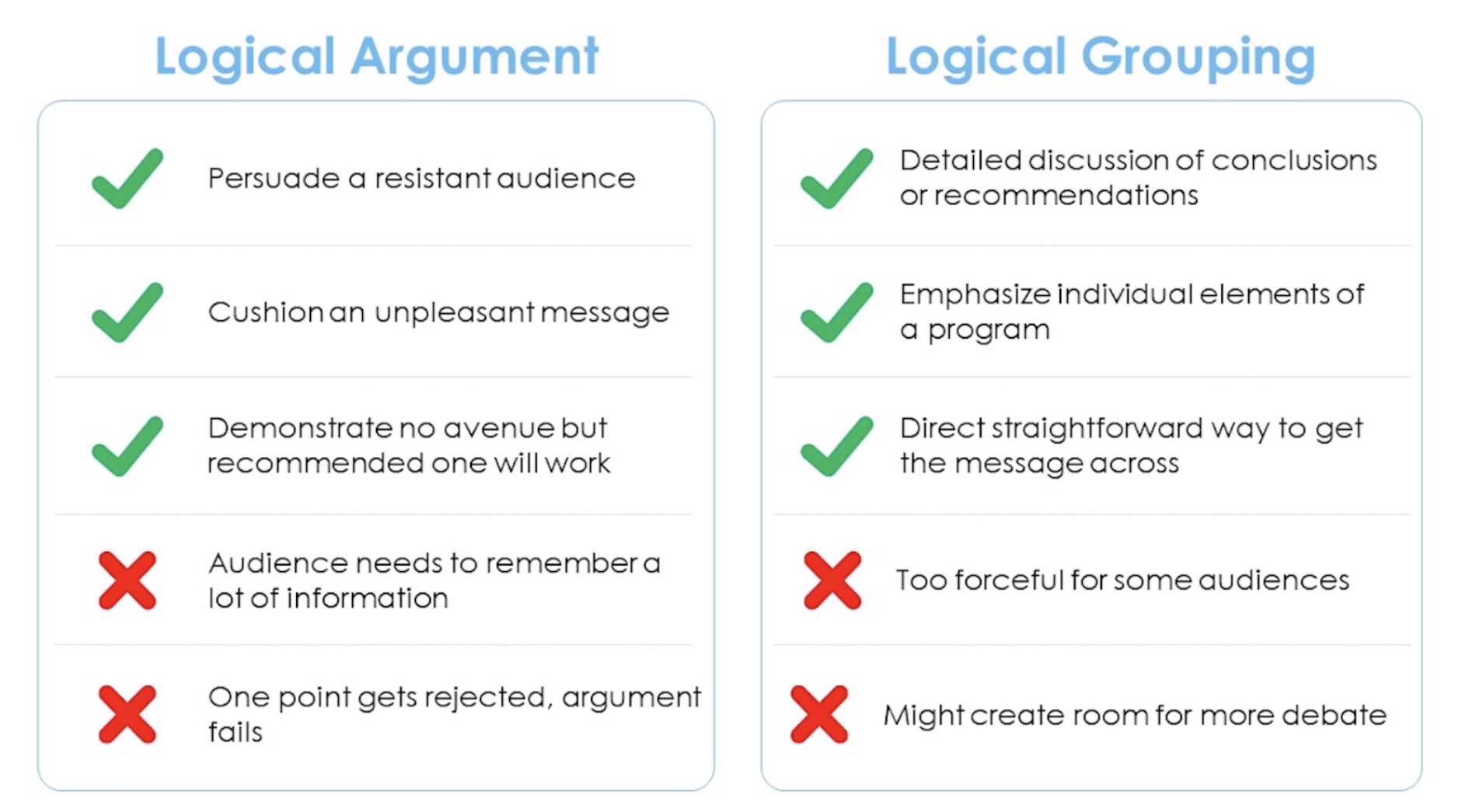
You’re presenting your topic and building your story. Now what?
Avoid dropping off at the end of your presentation with a thank you and abrupt end. End with a call to action to wrap up the entire presentation and leave a powerful and lasting impression.
Some possible approaches::
A well-written title captures the audience’s attention and alerts them to where you are in the storyline structure.
Titles should be more than just topic overviews—they should embody ideas. This way, your audience can grasp the main progression of events and key ideas from the titles, even if they don’t remember the supporting data.
Example: Instead of writing a short and dull title like “Operational Costs,” you can title the slide, “Operational costs are down 10% from last quarter” to transform the topic into an engaging idea.
Presentation graphics like pictures, videos, charts, and graphs support your main idea and key points. They give life to your ideas and visually move the story forward.
Graphics tell stories without words (and are often more effective than words!) and help emphasize the main ideas within each point.
When using the logical argument structure, you can add a primary graphic to each argument to visualize the point. This helps your audience remember each argument because they associate it with a visual.
Transform your presentations into compelling storylines with Prezent’s enterprise AI presentation tool. You can build hyper-customized presentation decks in minutes instead of hours thanks to the platform’s combination of audience empathy, tribal knowledge, business storytelling, and beautiful design.
With the help of Prezent’s library of over 35,000 slides and customized storytelling templates, your team presentations will be a home run every time.














