Last Updated :
May 27, 2025
Maria Kontgis

Introducing My Workspace: Your central hub for all the content powering your decks

My Workspace brings speed, organization, and efficiency to your workflow so you can create impactful, audience-ready presentations with ease.
Prezent Introducing My Workspace

No more re-uploading files. No more wasted time.

AI has made presentation building faster than ever. But let’s face it—digging through disorganized files, re-uploading the same documents, and waiting for content to process still eats up valuable time.

My Workspace is here to change that.

Now available inside Prezent, My Workspace is your personal content hub—a centralized space to store, organize, and reuse all the assets that power your presentations. Whether you're creating new slides with Auto Generator, Slide Library, Prezentation Library, or working across tools like Synthesis, or Template Converter, your files are always at your fingertips.

Why we built my workspace

This isn’t just another upload tool. My Workspace is a workflow upgrade.

Here’s what it unlocks:

  • Faster file access: Upload once and reuse across the platform.
  • Better performance: Pre-processed files lead to faster output in Auto Generator, Synthesis, and Template Converter
  • Smarter organization: Projects, tags, and search tools make it easy to stay on top of your content.
  • Team sharing: Share content with your teammates or organization with a click.

Whether you're crafting a deck for a high-stakes pitch or a recurring report, My Workspace makes it easier to work smarter, faster, and in a workflow that cuts down prep time, reduces friction, and helps you stay focused on what really matters—creating powerful, audience-ready presentations with ease.

What you can do with My Workspace:

  • Connect to other features: Managing a growing content library just got easier. With one click, send any file directly from My Workspace to Synthesis and Template Converter. No need to re-upload—just plug and play.
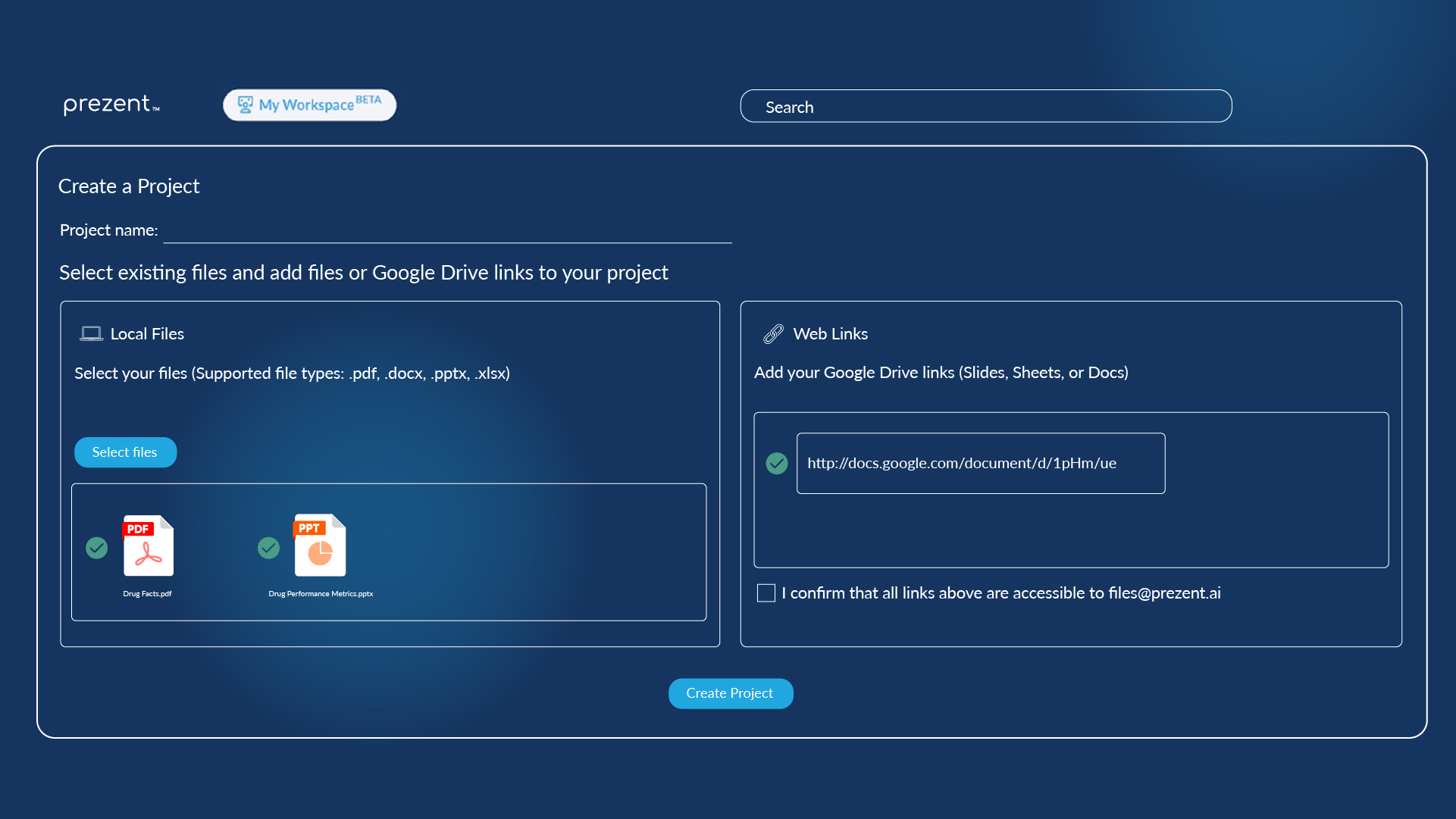
  • Streamline file management: Managing your content is simple and flexible. Group files by project, whether it’s a campaign, client, or theme—and reuse them anytime. Remove a file from a project without losing it. Your files stay safely in My Workspace and are ready to use whenever you need them
  • Quickly find any file using: A search bar in My Workspace makes it easy to find a file by name or tag, sorting by last used, created, and more. This helps especially when people have a large number of files.
  • Upload More Than Just Google Docs: We’ve made it easier to manage and use files across Prezent. Upload Google Doc links, regular web links and images too. Perfect for storing creative references, research links, or brand visuals you’ll want to reuse.
  • Built-In Storage Tracker: In the top-right of your Workspace panel under Storage, you can now see how much of your 2 GB limit you’ve used. Need more? Just click to request an upgrade from your CSM. 

A quick guide to how it works:

1. Upload once, use everywhere
Bring in files from your device or sync with Google Drive. We’ll handle the processing, so they’re ready to use across Prezent.

2. Let Prezent do the heavy lifting
Prezent reads and processes your files, so they’re ready to use in supported features like  Auto Generator, Synthesis, Template Converter, and other features—no delay, no extra steps.

3. Instantly launch Auto Generator, Synthesis, & Template Converter
With one click, launch AI features using any file as context. It’s faster, more relevant, and gets better results—especially for long or complex documents.

4. Stay organized with Projects
Group files into projects to keep My Workspace clean and focused. Projects let you build presentations with grouped content—no hunting, no guesswork.

5. Search and share with ease
Use the search bar and filters to find what you need in seconds. And when it’s time to collaborate, share your files with teammates (view-only mode for now; with editor access coming soon).

FAQs: Everything you need to know

1. What’s the maximum file size I can upload?

You can upload individual files up to 200 MB each. In total, My Workspace supports up to 2 GB of file storage—plenty of room for your decks, spreadsheets, and more.

2. Can I update or delete files after uploading?

Yes, absolutely. You’re always in control. You can easily update or remove files and projects whenever you need.

3. Which file types are supported?

You can upload common formats like .xlsx, .pptx, .docx,  .pdf,  jpg, and png —as well as regular web links, all in one place. You can also add links to Google Docs, Slides, and Sheets—Prezent handles those too.

4. How do I upload files to My Workspace?

You can upload files directly from your computer or paste in links from Google Drive. Just be sure to give access to files@prezent.ai when sharing Google files so everything works smoothly.

5. Is it safe to upload my files to the Prezent platform?

Absolutely. Prezent is fully GDPR-compliant, and your files are never used to train AI models. Files are only pre-processed to help generate faster and more accurate presentations, ensuring your data stays secure and private.

My Workspace isn’t just a feature—it’s your launchpad for building presentations faster and better.

By eliminating repetitive uploads, enabling powerful organization, and speeding up how you use files across Prezent, My Workspace helps you spend less time prepping and more time presenting.

Ready to experience it for yourself? Schedule a demo with our team or start your free trial today.

Ready to create impactful presentations?

Try for free
No items found.
No items found.
Related resources

BLOG
Supriya Sarkar
April 1, 2026
The best B2B AI tools for enterprise teams: Features, pros and cons, pricing, and use cases
Find the best B2B AI tools for enterprise teams. Evaluate features, pricing, pros and cons, and use cases to choose tools that fit your workflows and deliver measurable impact.
BLOG
Niyati Mahale
April 1, 2026
11 best Genspark AI alternatives I tested for 2026
This guide covers the best Genspark AI alternatives for content, SEO, and presentations. Compare features, pricing, and real-world usability to find the right tool.
BLOG
Supriya Sarkar
April 1, 2026
What is presentation software? A complete guide to how it works, what to look for, and how to choose the right one
What is a presentation software? This guide explains how it works, key features to look for, and how to choose the best presentation software.
BLOG
Supriya Sarkar
March 31, 2026
PopAI review: Complete breakdown of features, pricing, and alternatives
PopAI review: Is this AI tool right for business presentations? Explore features, pricing, limitations, and enterprise alternatives.
BLOG
Niyati Mahale
March 27, 2026
Microsoft Copilot review for presentations: features, pricing & limitations
Explore Microsoft Copilot’s features, pricing, and limitations for presentations. See how it performs and whether it fits your workflow.
BLOG
Niyati Mahale
March 27, 2026
Adobe Review (2026): Is Adobe InDesign Worth It for Business Use?
This Adobe review evaluates Adobe InDesign’s features, pricing, and usability. See how it performs for business workflows and where it falls short.
BLOG
Niyati Mahale
March 27, 2026
Best AI Pitch Deck Generators in 2026 (Tested & Reviewed)
I tested the best AI pitch deck generators to see which tools actually help you build clear, structured, and convincing pitch decks faster.
BLOG
Supriya Sarkar
March 26, 2026
10 Best PopAI alternatives: Compare features, AI capabilities, pricing, and free plans
Find the best PopAI alternatives and AI presentation makers. Compare AI features, pricing, and free plans to create smarter, more professional presentations.
BLOG
Niyati Mahale
March 27, 2026
Best Plus AI Alternatives in 2026: Top 8 AI Presentation Tools
I tested the best Plus AI alternatives to see which tools actually create presentation-ready decks. Here are the top AI presentation tools worth using in 2026.
BLOG
Supriya Sarkar
March 27, 2026
Nano Banana review: Evaluating strengths, workflow gaps, and AI solutions for enterprise presentations
Nano Banana review for enterprise presentations. Explore visual strengths, identify workflow gaps, and see how teams use AI to build faster, executive-ready presentations.
BLOG
Niyati Mahale
March 27, 2026
11 Best SlideShare Alternatives for Sharing Presentations
Explore the best SlideShare alternatives for creating and sharing presentations. Compare tools for hosting, collaboration, design, and presentation analytics.
BLOG
Niyati Mahale
March 23, 2026
Beautiful.ai Review (2026): Features, Pricing, Pros & Cons
An in-depth Beautiful.ai review covering features, pricing, pros, and limitations to help you decide if it’s the right presentation tool for your needs.
Free 14-Day Trial*

Customized On-Boarding*











