No items found.
No items found.

Investors are crucial for startups to get off the ground and start growing. However, pitching to a room of potential stakeholders can feel overwhelming without the proper tools. A strong startup pitch deck will give you the resources and confidence you need to win over investors and build a successful startup.
Learn what makes a great startup pitch presentation and how to use it to build trust and persuade investors.
Key takeaways:
A startup pitch deck is a presentation you give potential investors. It includes 10-20 slides and covers what your company has to offer.
A startup pitch deck is heavy on data, research, and metrics because you want to convince investors that you have a solid plan to grow and bring in revenue. The primary goal of the pitch is to demonstrate how investors will make a profit from your business. To accomplish this, you need to clearly show your vision, goals, and plan for achieving those goals.
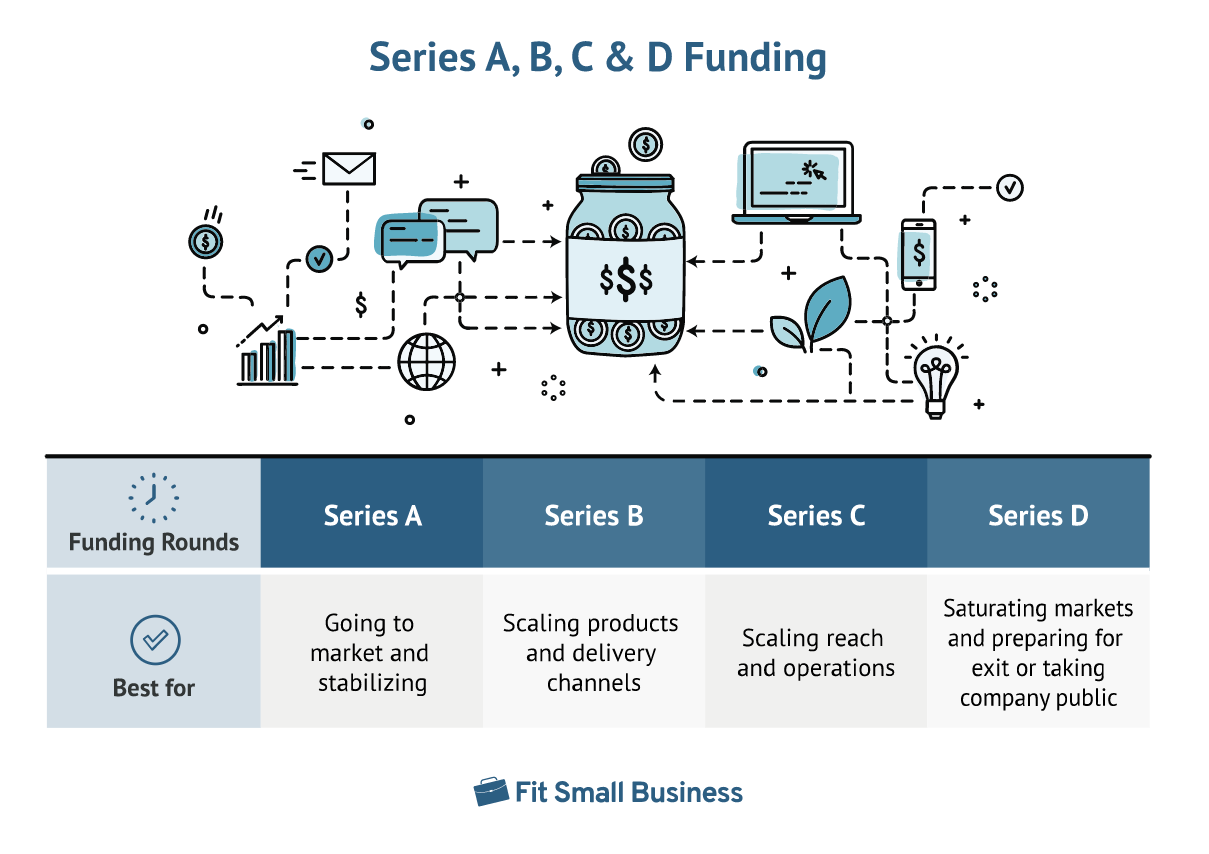
A startup pitch deck is a general term for generating funding through a presentation. You use startup pitch decks several times throughout a business’s lifecycle. Here are the five main stages where you need a startup pitch deck to attract new investors:
Here is a guide on investor pitch presentation.
Each stage requires a unique pitch deck customized to that stage’s purpose and funding goals. However, no matter the stage you’re at, a few elements will remain the same. For example, you’ll always present a problem, offer a solution, and persuade the audience that your company is a good investment by explaining what they would receive from the investment.
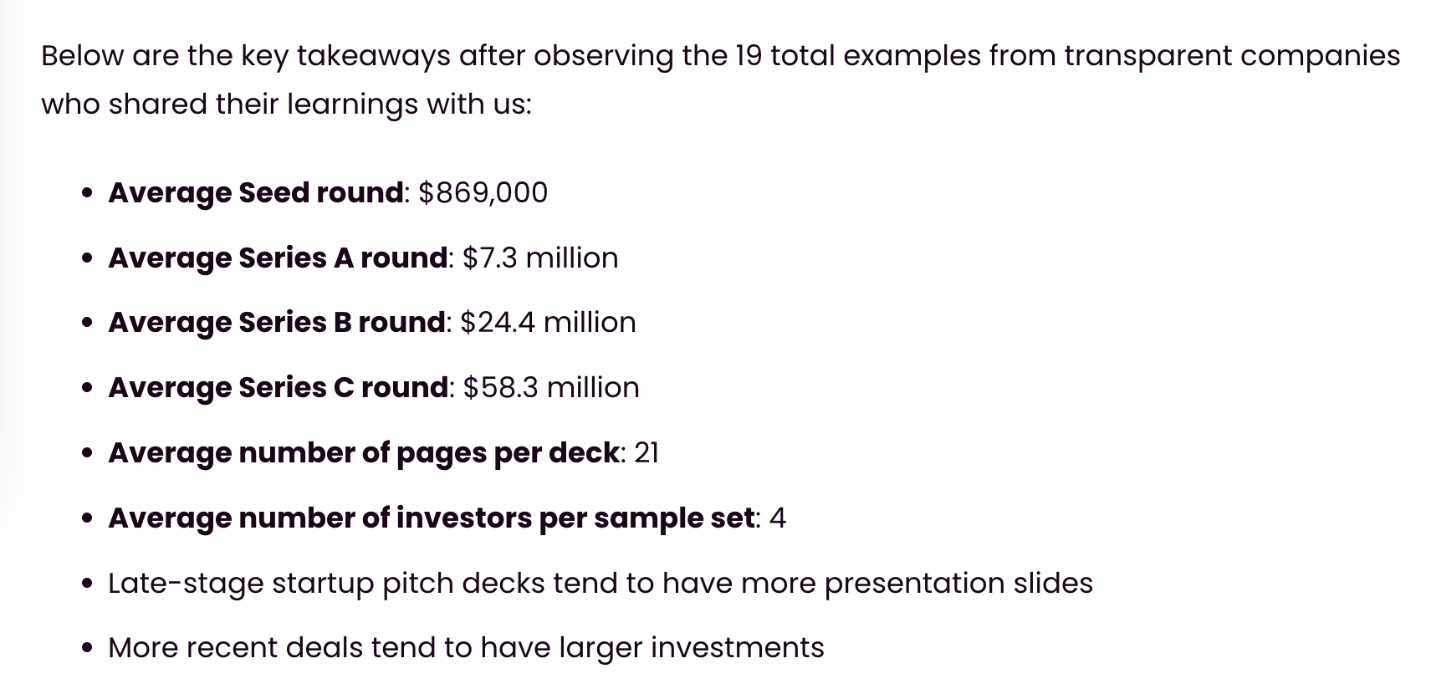
Cirrus Insight observed 19 startups with pitch decks and analyzed the average funding and pitch deck length. These are the results of these observations:
Use these ten elements to create your startup pitch deck and win over more investors for each funding stage.
Every startup pitch should start with a problem. This introduction is your hook to catch the investor’s attention. Use data, case studies, and research to bring home your point. Without a serious problem to solve, your product will have little or no demand.
After you’ve presented how dire the situation is, you introduce a solution. The solution should be specific and backed by research to show you fully understand the topic.
For example, you might conduct a survey or perform research to hear from your future consumers. The survey will prove that the problem you introduced is real and show what types of solutions consumers want.
Your solution slide is an ideal place to introduce your vision, as your vision should align with the solution.
The solution slides will naturally flow into a product introduction. The product section should stay short and simple. Ultimately, your investors aren’t concerned about what your product does because they aren’t customers looking to use it. They want to know whether the product has value and demand.
Therefore, you can skip a drawn-out explanation of the features and specs of your products. Instead, show how your product fills the need you presented.
You will take time to provide specific numbers during the solution and product section. Saying there’s a significant need for your products is only an introduction. Your investors want to know what “significant” means. Are there 10,000 potential customers or 100,000?
Explore who your customers are and how large the market size is to give your investors a more concrete idea of how lucrative your business can be.
You’ve now convinced the investors that your products have potential. Now, you’ll shift gears and dive into the HOW behind your plan. What is your operating plan? How will you reach that market and grow your business?
An actionable strategy shows how you’ll get from point A (funding) to point B (founding) and shows your numbers have value. You’re telling the investors why and how your market estimates are achievable goals.
If you already have some business wins, now is the time to show them through company data. Statistics about how far you’ve come will support your business model. Series B through D are most likely to have statistics, while pre-seed and Series A pitches won’t have much to show yet.
If there’s a need, there’s also a good possibility other businesses are also trying to fill it. Investors want to know what makes you different from those other businesses. During your presentation, you can take a moment to name some of the other companies, explain what they offer, then detail how you’re different and how that gives you an edge in the market.
Many companies choose to introduce their team at some point during the pitch. Near the end, while showing how you’re different, is an excellent place to insert this slide. By introducing the team, you’re building authority by showing you have well-trained and knowledgeable people on board to execute the plan you outlined.
Briefly outline where you’re going from here. These are your goals for the future and projected growth. You only need a slide to outline your marketing plan and may choose to combine the next steps with your ask slide as they complement each other.
For example, you could list the fundraising goal at the top of the slide along with a business goal you’ll achieve with the help of investors. Then outline the five-phase process for reaching that goal alongside specific steps.
The ask slide wraps up the presentation and gives the next step the investors can take. For example, it might be a definitive amount you need to raise to accomplish your goals and how you’ll use that funding. Other startups, especially in pre-seed pitches, stick with a contact slide encouraging investors to get in touch.
Prezent makes presentation design easy and convenient with more than 35,000 templates. Make your ideas heard with on-brand presentations built with key business storylines in mind. Our pitch deck software helps you design your startup pitch deck in a fraction of the time and win over investors with a unique and powerful design.













